An API is an Advanced Programming Interface; it is something that allows different software applications to communicate with each other. Provided it is done securely, it is a good thing for systems to be able to communicate - we call that interoperability.
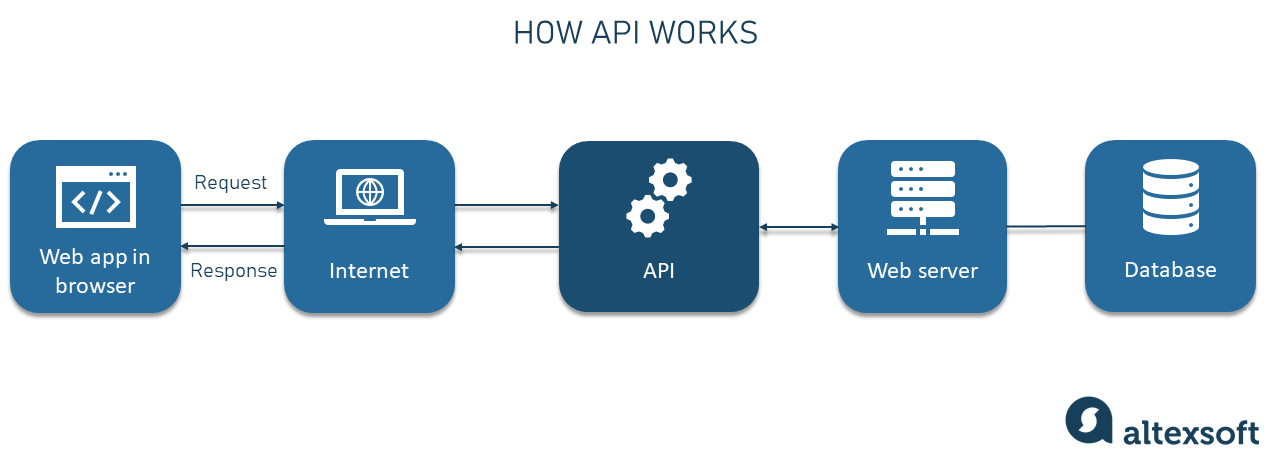
A Web API is an API provided by a Web server or by a Web browser. A server-side Web API allows Web apps running on servers to interact with other software (run by other users) remotely over the network. Users can obtain resources (e.g. files, data, etc) or trigger various actions, such as creating or updating data.
To interact with a Web API you need to know the API endpoints. Endpoints are carefully constructed Web addresses (URLs) which mean something to the API.
DHIS 2 has a (Web) API and you can look at it in your browser. You can see one example of the DHIS 2 API endpoints by logging into a DHIS 2 instance (for example, the demo version here with the user name admin and the password district). Then enter something like the following in your browser address bar: https://play.dhis2.org/40.0.0/api/resources.
All DHIS 2 API endpoints are made up of the minimal URL of the DHIS 2 instance, then “api”, then other things, all separated by forward slashes. The example above will show data in your browser, specifically data in a quite flexible format called JSON. Your browser will probably show this JSON data in an interactive way (you can usually click to drill down into the data), rather than in its raw form. The “api/resources” endpoint provides you with a useful list of all the different resources you can access via the DHIS 2 API, so it is a good place to start your exploration. Try clicking some of the links in the resources pages to see what you get.
When you entered the endpoint address above in your browser address bar, your browser sent a request to the server for the information, in the same way that it requests Web pages when you are browsing the Internet.
It uses a protocol called HTTP to do this. A protocol is just a kind of standardised operating procedure for computers. Rock climbers in the UK (at least those of my generation) shout “Climb when ready!” to indicate to their partner below that they can start to climb. The person below shouts “OK!” to confirm they understood, and then “Climbing!” when they actually have tied in and put their boots on and can start to climb. That is all a protocol is, a standardised system of exchanges like that.
HTTP provides a number of “verbs” or commands that allow your browser to interact with the Web app or server it is connected to. The most useful HTTP verb is GET, which perhaps unsurprisingly gets things.
When your browser wants a particular resource it sends a GET message to the server with the URL for the Web page, or the endpoint address for the API resource it wants, plus any other information required, such as that required for authentication (logging in).
The server responds with a numeric code (e.g. 200 means “OK” and indicates success, but other codes can indicate errors), some other information about what it is sending and of course the resource or Web page requested.
The browser then unpacks the response from the server and shows the Web page or resource to the user.
You can also send GET requests to Web apps from other software, including R and Python.
In R the package to use is httr.
You could try to get the list of resources in R with:
library(httr)
GET('https://play.dhis2.org/40.0.0/api/resources')
Response [https://play.dhis2.org/40.0.0/dhis-web-commons/security/login.action]
Date: 2023-06-14 07:19
Status: 200
Content-Type: text/html;charset=UTF-8
Size: 6.83 kB
<!DOCTYPE HTML>
<html class="loginPage" dir="ltr">
<head>
<title>DHIS 2 Demo - Sierra Leone</title>
<meta name="description" content="DHIS 2">
<meta name="keywords" content="DHIS 2">
<meta http-equiv="Content-Type" content="text/html; charset=UTF...
<link rel="shortcut icon" href="../../favicon.ico"/>
<script type="text/javascript" src="../javascripts/jQuery/jquer...
<script nonce="gXLruoCCkeR45vrim-vpoiSOQyTe4kE6">
...
Note that the DHIS 2 API returns various information packaged together: the date and time, a status code (here indicating success), the type of resource returned (here some HTML for the login page) and the size of the resource.
Note that even though you may be logged into the Web app with your browser, R is not logged into the Web app, so you need to provide your login credentials.
In R this is:
GET('https://play.dhis2.org/40.0.0/api/resources',
    authenticate('admin', 'district'))
Response [https://play.dhis2.org/40.0.0/api/resources]
Date: 2023-06-14 07:25
Status: 200
Content-Type: application/json;charset=UTF-8
Size: 13.3 kB
Looks like we got some JSON data this time.
Note that you should usually avoid hard-coding your credentials in scripts like this (it is the cybersecurity equivalent of leaving your front door keys under the mat) - these are secrets that should be handled with care. For DHIS 2 there are more secure approaches such as personal access tokens.
The httr package has various convenient functions which allow you to unpack various components of the Web app response.
To get the content of what is sent back, use the content function:
response <- GET('https://play.dhis2.org/40.0.0/api/resources',
    authenticate('admin', 'district'))
content(response)
The JSON data is converted into a nested list in R, made up of elements which look like this:
...
$resources[[88]]
$resources[[88]]$displayName
[1] "Legend Sets"

$resources[[88]]$singular
[1] "legendSet"

$resources[[88]]$plural
[1] "legendSets"

$resources[[88]]$href
[1] "https://play.dhis2.org/40.0.0/api/legendSets"


$resources[[89]]
$resources[[89]]$displayName
[1] "Data Element Groups"

$resources[[89]]$singular
[1] "dataElementGroup"

$resources[[89]]$plural
[1] "dataElementGroups"

$resources[[89]]$href
[1] "https://play.dhis2.org/40.0.0/api/dataElementGroups"
To get all the endpoints in this list you can use the following R code to get the fourth element of each item in the resources list:
sapply(response_content$resources, `[[`, 4)which gives you:
 [1] "https://play.dhis2.org/40.0.0/api/eventVisualizations"
 [2] "https://play.dhis2.org/40.0.0/api/programRules"
 [3] "https://play.dhis2.org/40.0.0/api/validationNotificationTemplates"
 [4] "https://play.dhis2.org/40.0.0/api/optionSets"
 [5] "https://play.dhis2.org/40.0.0/api/fileResources"
 [6] "https://play.dhis2.org/40.0.0/api/programStages"
 [7] "https://play.dhis2.org/40.0.0/api/categoryOptionGroups"
 [8] "https://play.dhis2.org/40.0.0/api/programSections"
 [9] "https://play.dhis2.org/40.0.0/api/validationRuleGroups"
[10] "https://play.dhis2.org/40.0.0/api/minMaxDataElements"
[11] "https://play.dhis2.org/40.0.0/api/eventCharts"
[12] "https://play.dhis2.org/40.0.0/api/dataElements"
[13] "https://play.dhis2.org/40.0.0/api/dataEntryForms"
[14] "https://play.dhis2.org/40.0.0/api/documents"
[15] "https://play.dhis2.org/40.0.0/api/programIndicatorGroups"
[16] "https://play.dhis2.org/40.0.0/api/trackedEntityTypes"
[17] "https://play.dhis2.org/40.0.0/api/externalFileResources"
[18] "https://play.dhis2.org/40.0.0/api/categoryCombos"
[19] "https://play.dhis2.org/40.0.0/api/indicators"
[20] "https://play.dhis2.org/40.0.0/api/constants"
[21] "https://play.dhis2.org/40.0.0/api/optionGroups"
[22] "https://play.dhis2.org/40.0.0/api/programStageWorkingLists"
[23] "https://play.dhis2.org/40.0.0/api/programIndicators"
[24] "https://play.dhis2.org/40.0.0/api/predictorGroups"
[25] "https://play.dhis2.org/40.0.0/api/eventFilters"
[26] "https://play.dhis2.org/40.0.0/api/categoryOptionGroupSets"
[27] "https://play.dhis2.org/40.0.0/api/programs"
[28] "https://play.dhis2.org/40.0.0/api/relationships"
[29] "https://play.dhis2.org/40.0.0/api/maps"
[30] "https://play.dhis2.org/40.0.0/api/programStageSections"
[31] "https://play.dhis2.org/40.0.0/api/validationResults"
[32] "https://play.dhis2.org/40.0.0/api/organisationUnits"
[33] "https://play.dhis2.org/40.0.0/api/programDataElements"
[34] "https://play.dhis2.org/40.0.0/api/programNotificationTemplates"
[35] "https://play.dhis2.org/40.0.0/api/validationRules"
[36] "https://play.dhis2.org/40.0.0/api/eventHooks"
[37] "https://play.dhis2.org/40.0.0/api/organisationUnitLevels"
[38] "https://play.dhis2.org/40.0.0/api/programRuleActions"
[39] "https://play.dhis2.org/40.0.0/api/predictors"
[40] "https://play.dhis2.org/40.0.0/api/organisationUnitGroupSets"
[41] "https://play.dhis2.org/40.0.0/api/dataStore"
[42] "https://play.dhis2.org/40.0.0/api/mapViews"
[43] "https://play.dhis2.org/40.0.0/api/sections"
[44] "https://play.dhis2.org/40.0.0/api/organisationUnitGroups"
[45] "https://play.dhis2.org/40.0.0/api/categoryOptionCombos"
[46] "https://play.dhis2.org/40.0.0/api/pushAnalysis"
[47] "https://play.dhis2.org/40.0.0/api/oAuth2Clients"
[48] "https://play.dhis2.org/40.0.0/api/eventReports"
[49] "https://play.dhis2.org/40.0.0/api/userRoles"
[50] "https://play.dhis2.org/40.0.0/api/metadata/proposals"
[51] "https://play.dhis2.org/40.0.0/api/icons"
[52] "https://play.dhis2.org/40.0.0/api/trackedEntityInstances"
[53] "https://play.dhis2.org/40.0.0/api/smsCommands"
[54] "https://play.dhis2.org/40.0.0/api/visualizations"
[55] "https://play.dhis2.org/40.0.0/api/categoryOptions"
[56] "https://play.dhis2.org/40.0.0/api/trackedEntityAttributes"
[57] "https://play.dhis2.org/40.0.0/api/messageConversations"
[58] "https://play.dhis2.org/40.0.0/api/categories"
[59] "https://play.dhis2.org/40.0.0/api/users"
[60] "https://play.dhis2.org/40.0.0/api/externalMapLayers"
[61] "https://play.dhis2.org/40.0.0/api/indicatorTypes"
[62] "https://play.dhis2.org/40.0.0/api/sqlViews"
[63] "https://play.dhis2.org/40.0.0/api/trackedEntityInstanceFilters"
[64] "https://play.dhis2.org/40.0.0/api/dataElementGroupSets"
[65] "https://play.dhis2.org/40.0.0/api/dashboards"
[66] "https://play.dhis2.org/40.0.0/api/interpretations"
[67] "https://play.dhis2.org/40.0.0/api/indicatorGroupSets"
[68] "https://play.dhis2.org/40.0.0/api/attributes"
[69] "https://play.dhis2.org/40.0.0/api/metadata/version"
[70] "https://play.dhis2.org/40.0.0/api/reports"
[71] "https://play.dhis2.org/40.0.0/api/dataApprovalWorkflows"
[72] "https://play.dhis2.org/40.0.0/api/analyticsTableHooks"
[73] "https://play.dhis2.org/40.0.0/api/relationshipTypes"
[74] "https://play.dhis2.org/40.0.0/api/programRuleVariables"
[75] "https://play.dhis2.org/40.0.0/api/dashboardItems"
[76] "https://play.dhis2.org/40.0.0/api/routes"
[77] "https://play.dhis2.org/40.0.0/api/userGroups"
[78] "https://play.dhis2.org/40.0.0/api/options"
[79] "https://play.dhis2.org/40.0.0/api/dataSets"
[80] "https://play.dhis2.org/40.0.0/api/indicatorGroups"
[81] "https://play.dhis2.org/40.0.0/api/dataSetNotificationTemplates"
[82] "https://play.dhis2.org/40.0.0/api/jobConfigurations"
[83] "https://play.dhis2.org/40.0.0/api/aggregateDataExchanges"
[84] "https://play.dhis2.org/40.0.0/api/dataApprovalLevels"
[85] "https://play.dhis2.org/40.0.0/api/dataElementOperands"
[86] "https://play.dhis2.org/40.0.0/api/apiToken"
[87] "https://play.dhis2.org/40.0.0/api/optionGroupSets"
[88] "https://play.dhis2.org/40.0.0/api/legendSets"
[89] "https://play.dhis2.org/40.0.0/api/dataElementGroups"
Let’s get the list of data elements (note that there is a separate endpoint for program data elements).
response <- GET('https://play.dhis2.org/40.0.0/api/dataElements',
    authenticate('admin', 'district'))
status_code(response)  # gives us 200, which means success, in case you need to check
sapply(content(response)$dataElements, `[[`, 1)
[1] "Accute Flaccid Paralysis (Deaths < 5 yrs)"
[2] "Acute Flaccid Paralysis (AFP) follow-up"
[3] "Acute Flaccid Paralysis (AFP) new"
[4] "Acute Flaccid Paralysis (AFP) referrals"
[5] "Additional medication"
[6] "Additional notes related to facility"
[7] "Admission Date"
[8] "Age in years"
[9] "Age of LLINs"
[10] "Albendazole given at ANC (2nd trimester)"
[11] "All access routes are clearly marked and safe"
[12] "All other follow-ups"
[13] "All other new"
[14] "All other referrals"
[15] "All sterilisation equipment is validated / licensed"
[16] "Anaemia follow-up"
[17] "Anaemia new"
[18] "Anaemia referrals"
[19] "An alternative to communicate if telephone line is off is always available"
[20] "ANC 1st visit"
[21] "ANC 2nd visit"
[22] "ANC 3rd visit"
[23] "ANC 4th or more visits"
[24] "Animal Bites - Rabid (Deaths < 5 yrs)"
[25] "Appropriate hand washing facilities are available"
[26] "ARI treated with antibiotics (pneumonia) follow-up"
[27] "ARI treated with antibiotics (pneumonia) new"
[28] "ARI treated with antibiotics (pneumonia) referrals"
[29] "ARI treated without antibiotics (cough) follow-up"
[30] "ARI treated without antibiotics (cough) new"
[31] "ARI treated without antibiotics (cough) referrals"
[32] "ART clients with new adverse clinical event"
[33] "ART defaulters"
[34] "ART enrollment stage 1"
[35] "ART enrollment stage 2"
[36] "ART enrollment stage 3"
[37] "ART enrollment stage 4"
[38] "ART entry point: No diagnostic testing"
[39] "ART entry point: No old patients"
[40] "ART entry point: No other"
[41] "ART entry point: No PMTCT"
[42] "ART entry point: No transfer in"
[43] "ART entry point: No transfer out"
[44] "ART entry point: No walk in"
[45] "ART entry point: TB"
[46] "ART new clients started on ARV"
[47] "ART No clients who stopped TRT due to adverse clinical status/event"
[48] "ART No clients who stopped TRT due to TRT failure"
[49] "ART No clients with change of regimen due to drug toxicity"
[50] "ART No clients with new adverse drug reaction"
Always be concerned when you get only a nice round number of elements like this from an API. It could mean that the API is limiting the number of items in its response, which is called “paging” and is done to manage the demand on the server - API endpoints could in theory return millions of items and you don’t want that to be the default. To turn off paging, modify the code above to this:
response <- GET('https://play.dhis2.org/40.0.0/api/dataElements?paging=false',
    authenticate('admin', 'district'))
sapply(content(response)$dataElements, `[[`, 1)
Note how we added a parameter to the API call, by appending ”?” (which means: “here come some parameters”) and a parameter in name=value format.
Parameters are analogous to the arguments you provide to an R function.
Now it returns over a thousand items (not shown).
You can add multiple parameters with &.
Say we wanted to search only for data elements containing the text “TB” (case-insensitive), and only wanted the first 10 results:
response <- GET('https://play.dhis2.org/40.0.0/api/dataElements?query=tb&pageSize=10',
+                 authenticate('admin', 'district'))
sapply(content(response)$dataElements, `[[`, 1)
[1] "ART entry point: TB"
[2] "Children from TB ward tested for HIV"
[3] "Children from TB ward with positive HIV result"
[4] "IPT 1st dose given by TBA"
[5] "IPT 2nd dose given by TBA"
[6] "Malaria Outbreak Threshold"
[7] "MCH TB Status"
[8] "PLHIVs referred for TB screening"
[9] "PLHIVs referred for TB test (Sputum/CXRay)"
[10] "PLHIVs with a positive TB result"
- Note that if you want to include any weird characters in your search term then you will need to look into URL encoding.
The DHIS 2 API is an example of a REST API, which means it adheres to some general principles but could still vary quite a lot in terms of syntax - for example, with a different API you might need to specify parameters in a different way. So in general you will want to consult the documentation for any particular API you are working with. For DHIS 2 you will tend to find this in the developer parts of the documentation such as here.
Some of the most useful things you can do with the DHIS 2 API are to extract or upload data. You can use the HTTP GET method in an R script to extract data from DHIS 2 in various formats - I will give some examples below.
Uploading data is slightly more complicated and uses the HTTP POST method - I will cover these in a later post. You can use HTTP methods to do anything you can do manually in the DHIS 2 Import/Export app. You can even use them to automatically create tables, charts and dashboards, or to trigger events in DHIS 2 such as running of validation rules.
You should consider the various options for extracting data from DHIS 2 via the API:
- extracting data from DHIS 2 Pivot Tables (or tables in the newer Data Visualizer app):
- there is an advantage to this in that you can do the work specifying the exact data you want in DHIS 2 by creating the table you want and then extracting that through the API - this is what I generally do
- for this you use the
api/analyticsendpoint
- extracting data from the underlying data tables
- might require more work on your part
- might give you more data than you need
- for this you use the
api/analytics/dataValueSetendpoint
- extracting data from a SQL View (SQL queries that you can create in the Maintenance app)
- for this you use the
api/sqlViewsendpoint - I have not needed this yet
- for this you use the
Here are some examples of these.
I usually cheat when extracting data from a Pivot Table or a table in the Data Visualizer app. I open the table in DHIS 2 in my browser - for example: https://play.dhis2.org/40.0.0/dhis-web-data-visualizer/index.html#/MBedgEQRVSn. In the Download menu, click “JSON” then “Name” and the table data will open in your browser. The URL is what you need - in this case it looks like this:
https://play.dhis2.org/40.0.0/api/analytics.json?dimension=dx%3AnFICjJluo74&dimension=ou%3AO6uvpzGd5pu%3Bfdc6uOvgoji%3Blc3eMKXaEfw%3BjUb8gELQApl%3BPMa2VCrupOd%3BkJq2mPyFEHo%3BqhqAxPSTUXp%3BVth0fbpFcsO%3BjmIPBj66vD6%3BTEQlaapDQoK%3BbL4ooGhyHRQ%3BeIQbndfxQMb%3Bat6UHUQatSo&dimension=pe%3ALAST_12_MONTHS&showHierarchy=false&hierarchyMeta=false&includeMetadataDetails=true&includeNumDen=true&skipRounding=false&completedOnly=false&outputIdScheme=NAME
Change the “json” to “csv” (assuming you want CSV data) and you have the API call to get that data (note that the data won’t be extracted exactly as you see it in the browser, particularly if the formatting has been tweaked manually).
https://play.dhis2.org/40.0.0/api/analytics.csv?dimension=dx%3AnFICjJluo74&dimension=ou%3AO6uvpzGd5pu%3Bfdc6uOvgoji%3Blc3eMKXaEfw%3BjUb8gELQApl%3BPMa2VCrupOd%3BkJq2mPyFEHo%3BqhqAxPSTUXp%3BVth0fbpFcsO%3BjmIPBj66vD6%3BTEQlaapDQoK%3BbL4ooGhyHRQ%3BeIQbndfxQMb%3Bat6UHUQatSo&dimension=pe%3ALAST_12_MONTHS&showHierarchy=false&hierarchyMeta=false&includeMetadataDetails=true&includeNumDen=true&skipRounding=false&completedOnly=false&outputIdScheme=NAME
- note that this is just a more complex set of parameters
%3Ais URL encoding for a colon (:)%3Bis URL encoding for a semi-colon (;)- the DHIS 2 data model has three dimensions: what (data elements), where (organisation units) and when (periods)
dimension=dx%3AnFICjJluo74means “I want the data element with the code nFICjJluo74”dimension=ou%3AO6uvpzGd5pu%3Bfdc6uOvgojimeans “I want the organisation units with the codesO6uvpzGd5puandfdc6uOvgojidimension=pe%3ALAST_12_MONTHSmeans “I want the last 12 months’ data”- finally there are some other parameters which you may occasionally want to change - if you want the codes for organisation units you could use
outputIDScheme=CODE(I have not found a way to get both name and code yet) at the end instead, or setshowHierarchy=trueto get a field showing the organisation hierarchy (as a “path”)
So let’s do this in R.
response <- GET('https://play.dhis2.org/40.0.0/api/analytics.csv?dimension=dx%3AnFICjJluo74&dimension=ou%3AO6uvpzGd5pu%3Bfdc6uOvgoji%3Blc3eMKXaEfw%3BjUb8gELQApl%3BPMa2VCrupOd%3BkJq2mPyFEHo%3BqhqAxPSTUXp%3BVth0fbpFcsO%3BjmIPBj66vD6%3BTEQlaapDQoK%3BbL4ooGhyHRQ%3BeIQbndfxQMb%3Bat6UHUQatSo&dimension=pe%3ALAST_12_MONTHS&showHierarchy=false&hierarchyMeta=false&includeMetadataDetails=true&includeNumDen=true&skipRounding=false&completedOnly=false&outputIdScheme=NAME',
                authenticate('admin', 'district'))
csvdata <- content(response, 'text')
library(data.table)
fread(csvdata)
Data Organisation unit Period Value Numerator Denominator Factor
1: Malaria case count Pujehun July 2022 937 NA NA NA
2: Malaria case count Koinadugu October 2022 118 NA NA NA
3: Malaria case count Western Area December 2022 213 NA NA NA
4: Malaria case count Kenema February 2023 872 NA NA NA
5: Malaria case count Moyamba November 2022 347 NA NA NA
---
152: Malaria case count Bonthe April 2023 259 NA NA NA
153: Malaria case count Kailahun February 2023 455 NA NA NA
154: Malaria case count Koinadugu November 2022 90 NA NA NA
155: Malaria case count Bo June 2022 879 NA NA NA
156: Malaria case count Bonthe September 2022 295 NA NA NA
Multiplier Divisor
1: NA NA
2: NA NA
3: NA NA
4: NA NA
5: NA NA
---
152: NA NA
153: NA NA
154: NA NA
155: NA NA
156: NA NA
- Note that I specified I wanted the data as text (otherwise it guesses wrongly that you want it in another format).
- I usually then read the CSV text into data using the
freadfunction from thedata.tablepackage.
To get data from the api/analytics/dataValueSet endpoint in R, you can modify the API call above to:
response <- GET('https://play.dhis2.org/40.0.0/api/analytics/dataValueSet.csv?dimension=dx%3AnFICjJluo74&dimension=ou%3AO6uvpzGd5pu%3Bfdc6uOvgoji%3Blc3eMKXaEfw%3BjUb8gELQApl%3BPMa2VCrupOd%3BkJq2mPyFEHo%3BqhqAxPSTUXp%3BVth0fbpFcsO%3BjmIPBj66vD6%3BTEQlaapDQoK%3BbL4ooGhyHRQ%3BeIQbndfxQMb%3Bat6UHUQatSo&dimension=pe%3ALAST_12_MONTHS',
                authenticate('admin', 'district'))
csvdata <- content(response, 'text')
fread(csvdata)
and you get:
     data_element period organisation_unit category_option_combo attribute_option_combo
  1:  nFICjJluo74 202207       bL4ooGhyHRQ                    NA                     NA
  2:  nFICjJluo74 202210       qhqAxPSTUXp                    NA                     NA
  3:  nFICjJluo74 202212       at6UHUQatSo                    NA                     NA
  4:  nFICjJluo74 202302       kJq2mPyFEHo                    NA                     NA
  5:  nFICjJluo74 202211       jmIPBj66vD6                    NA                     NA
 ---
152:  nFICjJluo74 202304       lc3eMKXaEfw                    NA                     NA
153:  nFICjJluo74 202302       jUb8gELQApl                    NA                     NA
154:  nFICjJluo74 202211       qhqAxPSTUXp                    NA                     NA
155:  nFICjJluo74 202206       O6uvpzGd5pu                    NA                     NA
156:  nFICjJluo74 202209       lc3eMKXaEfw                    NA                     NA
     value    stored_by    created last_updated      comment follow_up
  1:   937 [aggregated] 2023-06-14   2023-06-14 [aggregated]     FALSE
  2:   118 [aggregated] 2023-06-14   2023-06-14 [aggregated]     FALSE
  3:   213 [aggregated] 2023-06-14   2023-06-14 [aggregated]     FALSE
  4:   872 [aggregated] 2023-06-14   2023-06-14 [aggregated]     FALSE
  5:   347 [aggregated] 2023-06-14   2023-06-14 [aggregated]     FALSE
 ---
152:   259 [aggregated] 2023-06-14   2023-06-14 [aggregated]     FALSE
153:   455 [aggregated] 2023-06-14   2023-06-14 [aggregated]     FALSE
154:    90 [aggregated] 2023-06-14   2023-06-14 [aggregated]     FALSE
155:   879 [aggregated] 2023-06-14   2023-06-14 [aggregated]     FALSE
156:   295 [aggregated] 2023-06-14   2023-06-14 [aggregated]     FALSE
More on the API to come.